EDI Product Mappings
What Is EDI Product Mappings?
EDI Product Mappings allows you to map vendor products to system products for Electronic Data Interchange (EDI) processing. This screen supports viewing and updating EDI product mappings and managing EDI product updates.
Navigate To EDI Mapping Screen
The EDI Product Mappings screen displays existing product mappings between EDI vendor products and CulinarySuite system products.
Click on ERP on the main navigation menu and hover on Vendor.
Click on EDI Product Mappings from the Vendor submenu.

EDI Product Update
The EDI Product Update screen allows you to update the EDI product mapping records. Use this screen to align vendor EDI product codes with the correct system product entries.
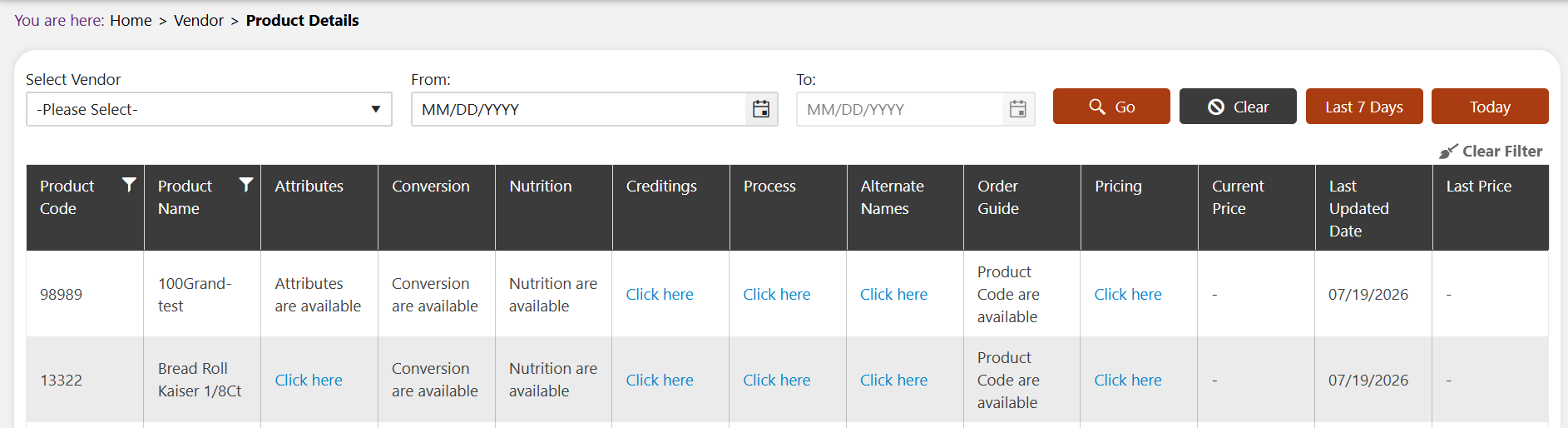
- Select Vendor: Select the vendor from the dropdown.
- From: Enter the start date, or click the calendar icon, to filter the table from this date.
- To: Enter the end date, or click the calendar icon, to filter the table up to this date.
- Go: Click to apply the selected filter criteria and generate the table below.
- Clear: Click to clear the selected filter criteria.
- Last 7 Days: Click to filter the table to show records updated in the last 7 days.
- Today: Click to filter the table to show records updated today.
- Clear Filter: Click to remove any filters applied on the table columns.
The table below is generated with the following columns:
- Product Code: The system product code.
- Product Name: The name of the product.
- Attributes: Shows whether attribute data is available for this product; click Click here to view it.
- Conversion: Shows whether conversion data is available for this product; click Click here to view it.
- Nutrition: Shows whether nutrition data is available for this product; click Click here to view it.
- Creditings: Click Click here to view the crediting information for this product.
- Process: Click Click here to view the process information for this product.
- Alternate Names: Click Click here to view the alternate names for this product.
- Order Guide: Shows whether order guide data is available for this product.
- Pricing: Click Click here to view the pricing information for this product.
- Current Price: Displays the current price of the product, if available.
- Last Updated Date: Displays the date this product mapping was last updated.
- Last Price: Displays the previous price of the product, if available.